
Let me guess. You’ve watched five “Learn JavaScript in 4 hours” videos, bookmarked forty tabs, and you still feel like everyone else got a secret handbook you never received. Here’s the truth nobody says out loud: JavaScript isn’t hard. It’s just usually taught badly — in scattered pieces that never connect. So this is my promise to you. Read this one page, top to bottom, and you will walk away actually understanding the language: how it thinks, how it runs, and how to bend it to your will. No forty tabs. Just this one. Grab a coffee — let’s make it click.
Why JavaScript is worth your time
JavaScript is the only programming language that runs natively in every web browser on Earth. That’s billions of devices that already speak it, no install required. But it didn’t stop at the browser — with Node.js it now runs servers, with React Native it builds mobile apps, and with tools like Electron it powers desktop apps you use every day (VS Code, Slack, Discord — all JavaScript under the hood).
Learn this one language well and you can build the entire stack: the button someone clicks, the server that answers, and the database call behind it. That reach is exactly why it’s the most popular language on the planet, year after year. You’re not learning a toy. You’re learning the language the modern web is built on.
Running your very first line of JavaScript
You don’t need to install a single thing to start. Open any web browser,
press F12 (or right-click → Inspect), click the
Console tab, and type this:
console.log("Hello, world!");
Hit Enter. You just ran JavaScript. console.log() is your best
friend for the rest of your career — it prints anything you hand it, and
it’s how you’ll peek inside your code to see what’s actually
happening. Get cozy with it now.
To run JavaScript on a real web page, you drop it into an HTML file with a
<script> tag, ideally right before the closing
</body>:
<!DOCTYPE html>
<html>
  <body>
    <h1>My first page</h1>

    <script>
      console.log("The script is running!");
      alert("Welcome 👋");
    </script>
  </body>
</html>
Open that file in a browser and you’ll see the alert pop up. That’s the entire loop: write JavaScript, load the page, watch it run. Everything else in this guide is just what you write inside that script.
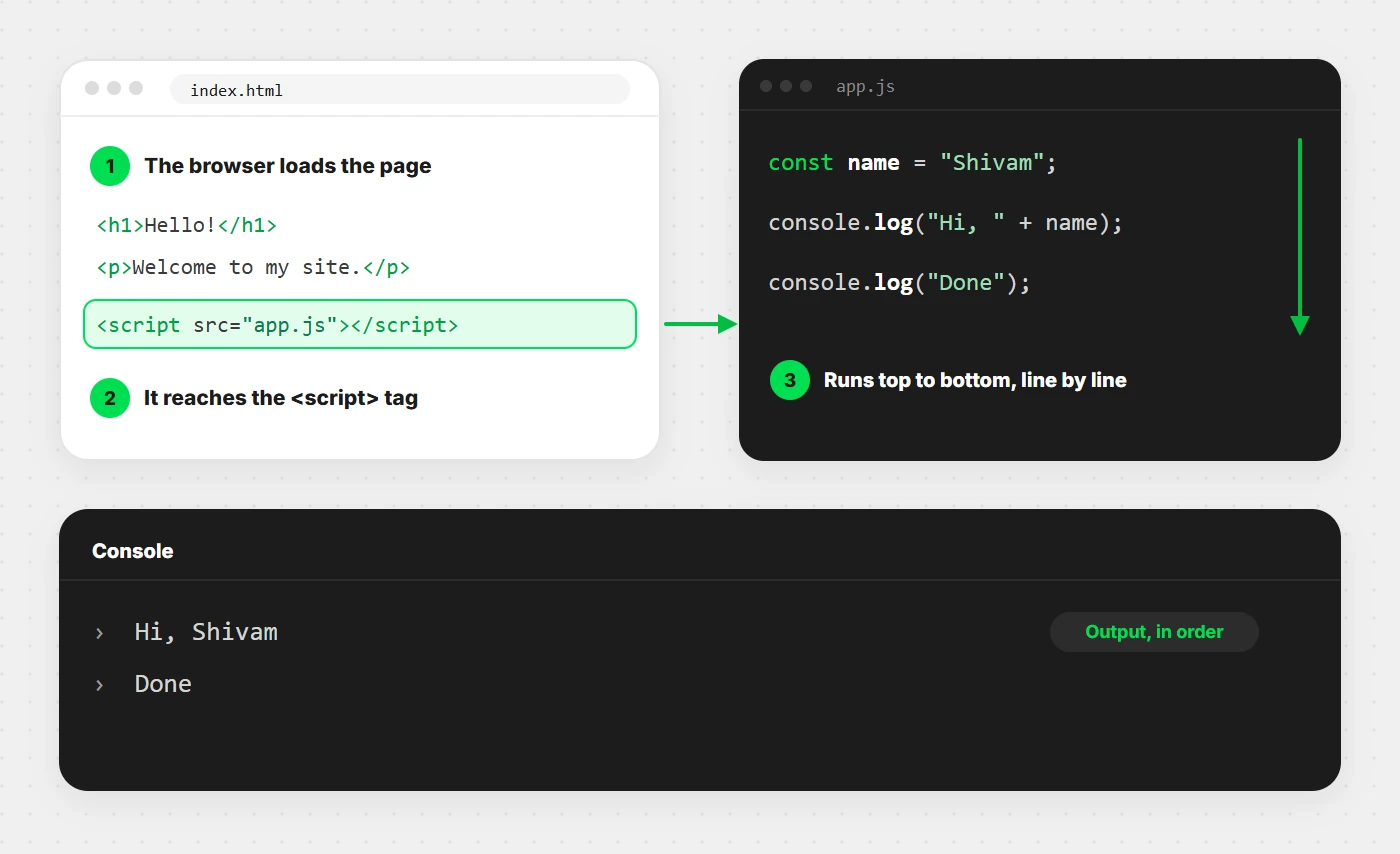
<script> tag, and executes your JavaScript top to bottom.Variables & data types
A variable is a labelled box you store a value in. In modern
JavaScript you create one with const or let —
and you’ll use const most of the time.
const name = "Riya";   // never gets reassigned → use const
let score = 0;         // will change later → use let
score = 10;            // ✅ allowed, because it's let

// name = "Aman";      // ❌ error: can't reassign a const
Rule of thumb: reach for const by default, and only
switch to let when you know the value will change. Avoid the old
var — it has confusing scoping rules that cause real bugs. We
cover exactly why in the mistakes section.
The data types you’ll actually use
Every value in JavaScript has a type. Here are the ones that matter day to day:
| Type | Example | What it’s for |
|---|---|---|
String | "hello" | Text, always in quotes |
Number | 42, 3.14 | Any number, whole or decimal |
Boolean | true, false | Yes/no, on/off decisions |
Array | [1, 2, 3] | An ordered list of values |
Object | { name: "Riya" } | Grouped, named data |
null | null | “Intentionally empty” |
undefined | undefined | “Not set yet” |
JavaScript is dynamically typed — you never declare the
type, the value just has one. You can check it any time with
typeof:
typeof "hello";   // "string"
typeof 42;        // "number"
typeof true;      // "boolean"
typeof [1, 2];    // "object"  (arrays are objects under the hood)
Operators & the === trap
Operators do the work — math, comparison, logic:
// Math
10 + 3;   // 13
10 % 3;   // 1   ← remainder (super useful for "is it even?")
2 ** 3;   // 8   ← power (2 to the 3rd)

// Logic
true && false;  // false  (AND: both must be true)
true || false;  // true   (OR: at least one true)
!true;          // false  (NOT: flips it)
Now the single most important gotcha for beginners — always compare
with ===, never ==:
5 === 5;      // true
5 === "5";    // false  ← different types, and === respects that

5 == "5";     // true   😱 == quietly converts "5" into a number first
0 == "";      // true   😱 more nonsense from loose ==
0 === "";     // false  ✅ strict, predictable, correct
The double-equals == tries to be “helpful” by converting
types before comparing, and it produces surprises that cost hours of debugging.
The triple-equals === checks value and type. Use it every
single time and this entire category of bug disappears.
Conditions & loops
Code that just runs top to bottom is boring. Conditions let it make decisions:
const age = 18;

if (age >= 18) {
  console.log("You can vote.");
} else if (age >= 13) {
  console.log("Almost there.");
} else {
  console.log("Too young.");
}
Loops let it repeat without you copy-pasting. The two you’ll reach for constantly:
// Classic for loop — when you need an index
for (let i = 0; i < 3; i++) {
  console.log("Count:", i);   // 0, 1, 2
}

// for...of — when you just want each item (cleaner, preferred)
const fruits = ["apple", "banana", "cherry"];
for (const fruit of fruits) {
  console.log(fruit);
}
Beginners overuse the classic for. In real code, for...of
(and the array methods we’ll meet shortly) read far better. If you don’t
need the index number, don’t ask for it.
Functions — the heart of the language
A function is a reusable block of code you name once and run as many times as you like. This is where JavaScript stops being a calculator and starts being a language.
// Function declaration
function greet(name) {
  return "Hello, " + name + "!";
}

greet("Riya");   // "Hello, Riya!"
greet("Aman");   // "Hello, Aman!"
Modern JavaScript loves arrow functions — shorter, and everywhere in real code. These two are equivalent:
// Traditional
function add(a, b) {
  return a + b;
}

// Arrow function — same thing, less noise
const add = (a, b) => a + b;

add(2, 3);   // 5
One concept that trips everyone up early is scope — where a variable is “visible.” A variable declared inside a function lives only inside that function:
function secret() {
  const password = "1234";
  console.log(password);   // ✅ works — we're inside
}

secret();
console.log(password);      // ❌ error — password doesn't exist out here
This is a feature, not an annoyance. Scope keeps your variables from colliding with each other as your programs grow. Think of each function as its own private room.
Arrays & objects (your daily workhorses)
90% of real JavaScript is moving data around in arrays (ordered lists) and objects (named data). Master these two and you’ve mastered most of the job.
// An array: an ordered list
const scores = [90, 85, 100];
scores[0];        // 90  ← counting starts at 0, always
scores.length;    // 3
scores.push(75);  // add to the end → [90, 85, 100, 75]

// An object: named data
const user = {
  name: "Riya",
  age: 24,
  isAdmin: false,
};
user.name;        // "Riya"
user.age = 25;    // update a value
The three array methods that change everything
Once these three click, you’ll write half as much code. Learn them by
heart — map, filter, reduce:
const nums = [1, 2, 3, 4];

// map → transform every item into a new array
nums.map(n => n * 2);          // [2, 4, 6, 8]

// filter → keep only items that pass a test
nums.filter(n => n % 2 === 0); // [2, 4]  (evens only)

// reduce → boil the whole array down to one value
nums.reduce((sum, n) => sum + n, 0);  // 10  (the total)
Notice you never wrote a loop or a counter. You described what you wanted, not the step-by-step how. That shift — from loops to array methods — is the moment beginners start writing code that looks professional.
Learn arrays, objects, and functions cold. Everything else in JavaScript is a variation on those three.
The DOM — making a page come alive
Here’s where JavaScript stops being abstract and starts moving things on screen. The DOM (Document Object Model) is the browser’s live, tree-shaped representation of your HTML page — and JavaScript can read and change it in real time.
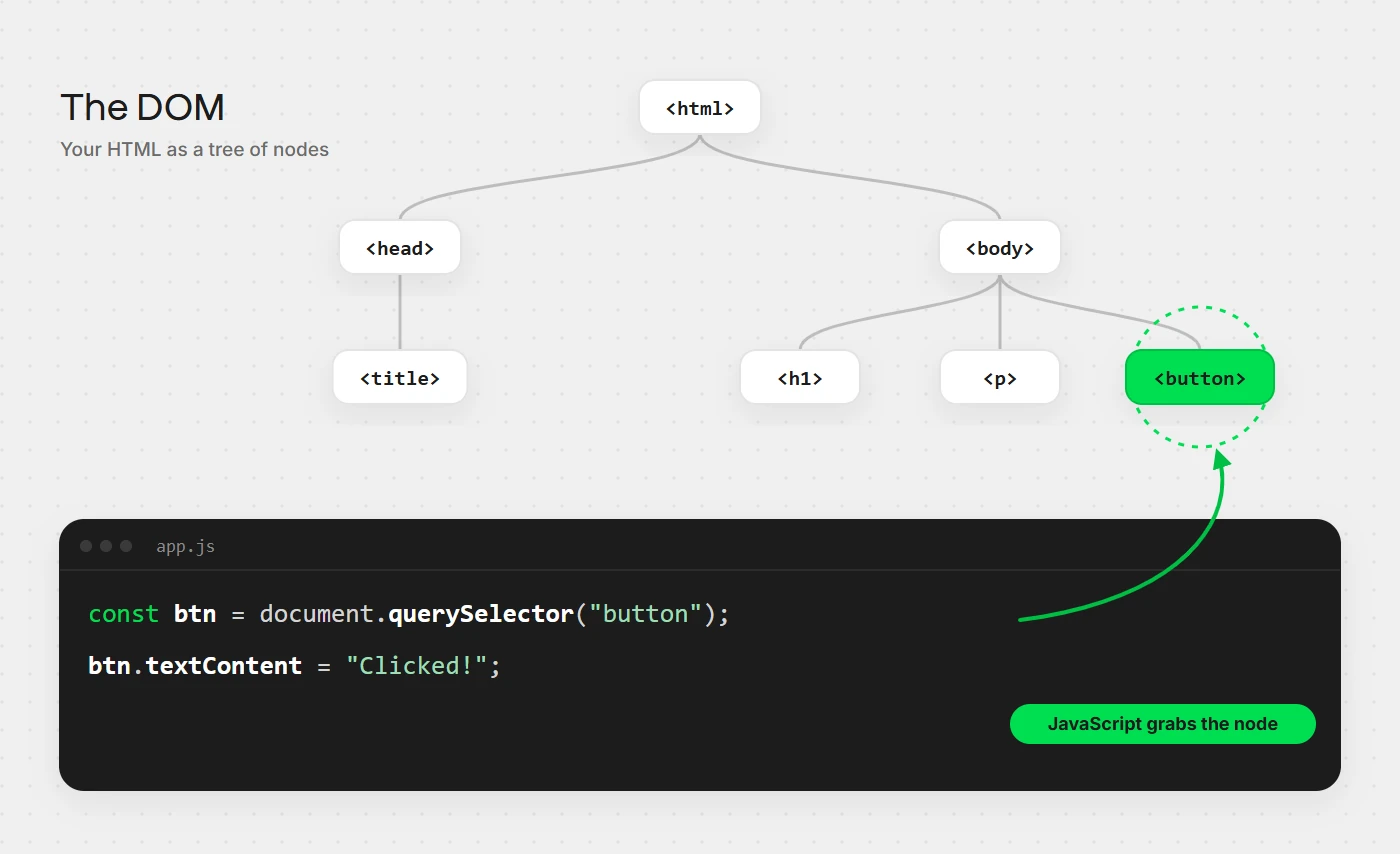
The pattern is always the same: select an element, then do something to it.
// 1. Select an element
const title = document.querySelector("h1");

// 2. Change it
title.textContent = "Changed by JavaScript!";
title.style.color = "tomato";
And the reason web pages feel interactive is events — you tell an element to listen for something (a click, a keypress) and run code when it happens:
const button = document.querySelector("button");

button.addEventListener("click", () => {
  alert("You clicked me!");
});
That’s the whole secret behind every button, dropdown, form, and slider you’ve ever used on the web. Select → listen → react. Build a few tiny things with just this — a counter, a to-do list, a theme toggle — and the DOM will never intimidate you again.
Modern ES6+ features you must know
In 2015, JavaScript got a massive upgrade called ES6, and it’s been improving every year since. These are the modern features you’ll see in every real codebase — skip them and other people’s code will look like hieroglyphics.
Template literals
Build strings without the ugly + soup, using backticks:
const name = "Riya";
const age = 24;

// Old way
"Hi, " + name + ". You are " + age + ".";

// Modern way — backticks and ${}
`Hi, ${name}. You are ${age}.`;   // "Hi, Riya. You are 24."
Destructuring
Pull values out of arrays and objects in one clean line:
const user = { name: "Riya", age: 24 };
const { name, age } = user;   // grab both at once
console.log(name);            // "Riya"

const [first, second] = [10, 20];
console.log(first);           // 10
Spread & rest (...)
The three-dot operator copies, merges, and gathers:
// Spread — copy and merge
const a = [1, 2];
const b = [...a, 3, 4];        // [1, 2, 3, 4]

const base = { role: "user" };
const admin = { ...base, role: "admin" };  // { role: "admin" }

// Rest — gather leftover arguments
function sum(...numbers) {
  return numbers.reduce((t, n) => t + n, 0);
}
sum(1, 2, 3, 4);   // 10
Modules (import / export)
Real apps split code across files. Modules let files share code cleanly:
// math.js
export const add = (a, b) => a + b;

// app.js
import { add } from "./math.js";
add(2, 3);   // 5
You don’t need to memorize all of ES6 today. Template literals, destructuring, and spread alone will modernize your code overnight — add the rest as you meet them.
Asynchronous JavaScript & the event loop
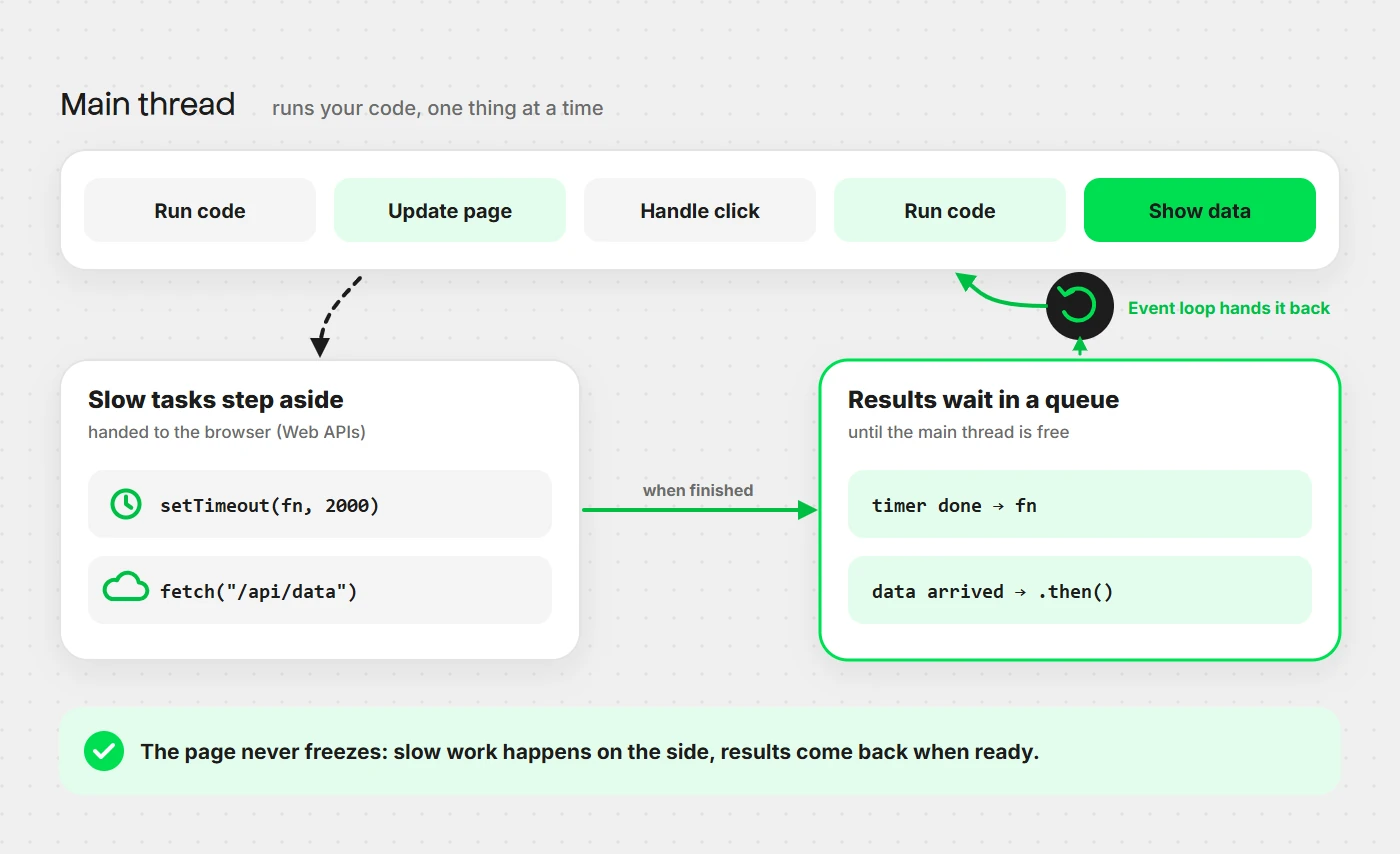
This is the topic that separates “I know JavaScript syntax” from “I actually understand JavaScript.” Some tasks take time — fetching data from a server, reading a file, waiting for a timer. JavaScript doesn’t freeze while it waits; it moves on and comes back when the result is ready. That’s asynchronous code.
The evolution: callbacks → promises → async/await
Old async code used callbacks — a function you pass in to run “when it’s done.” They worked, but nesting them got ugly fast (the infamous “callback hell”). Then came promises, an object representing a value that’ll arrive later:
fetch("https://api.example.com/user")
  .then(response => response.json())
  .then(data => console.log(data))
  .catch(error => console.log("Something broke:", error));
And then came the syntax that made it all readable — async/await. It lets you write asynchronous code that reads like normal top-to-bottom code:
async function getUser() {
  try {
    const response = await fetch("https://api.example.com/user");
    const data = await response.json();
    console.log(data);
  } catch (error) {
    console.log("Something broke:", error);
  }
}

getUser();
await pauses the function until the promise resolves, then hands you
the result — no .then() chains, no nesting. This is how modern
JavaScript talks to servers, and you’ll write it every day. If only one
thing from this section sticks, make it async/await.
Common beginner mistakes
Sidestep these five and you’ll skip weeks of frustration:
- Using
==instead of===— loose equality converts types behind your back. Always use===. - Still using
var— it’s function-scoped and hoisted in confusing ways. Useconstandlet, which are block-scoped and predictable. - Forgetting arrays are zero-indexed — the first item is
arr[0], notarr[1]. This one bites everyone at least once. - Not handling errors in async code — wrap
awaitcalls intry/catch, or a failed network request crashes silently. - Mutating data you didn’t mean to — objects and arrays are passed by reference, so a copy can accidentally change the original. Use the spread operator (
{ ...obj }) to make real copies.
Every one of these is a rite of passage. Knowing them in advance means you get to skip the painful debugging session and go straight to writing good code.
Tools & what to learn next
Your toolkit: VS Code as your editor; the browser DevTools console for testing and debugging; MDN Web Docs as the reference you’ll trust for life; and Node.js once you want to run JavaScript outside the browser.
Your roadmap from here: build small before you build big. Make a
counter, a to-do list, a tip calculator, a weather app that calls a real API with
fetch. Once plain JavaScript feels natural, then pick up a
framework like React — it’ll feel easy, because
it’s just JavaScript wearing a nice outfit. Don’t rush to frameworks;
the fundamentals on this page are what make everything after them simple.
Go deeper: the topic deep dives
This page is your map. When you’re ready to go from “I get it” to “I could teach it,” each of these companion guides zooms into one topic with more examples and the gotchas that separate beginners from pros:
- JavaScript Closures Explained — scope, lexical scope, private variables, and the classic loop bug.
- Async JavaScript Deep Dive — the event loop, promises, async/await, and microtasks vs macrotasks.
- JavaScript DOM & Events — selecting, changing and creating elements, plus event bubbling and delegation.
More deep dives — prototypes, classes, error handling and modern ES6+ — are on the way.
Wrapping this up
Look back at what you just walked through: variables, types, operators, conditions, loops, functions, arrays, objects, the DOM, modern ES6+ syntax, and asynchronous code. That’s not a sampler — that’s the actual core of the language. Every advanced JavaScript topic you’ll ever meet is built on these exact bricks.
Here’s the part that matters most: reading this once isn’t enough, and it was never meant to be. Open your browser console right now and type out five examples from this page by hand. Break them on purpose. Fix them. That loop — write, break, fix — is the entire secret to learning to code. There’s no other one.
You came in feeling like everyone else got a secret handbook. You just read it. Now go build something. 🚀