
Every button you’ve ever clicked, every menu that slid open, every form that yelled “invalid email” — that’s the DOM being manipulated by JavaScript. This is the exact skill that turns a static page into an app, and it’s far simpler than it looks: there’s really just one pattern to learn, repeated forever. I’m Shivam Thakur — let me hand you that pattern.
What the DOM really is
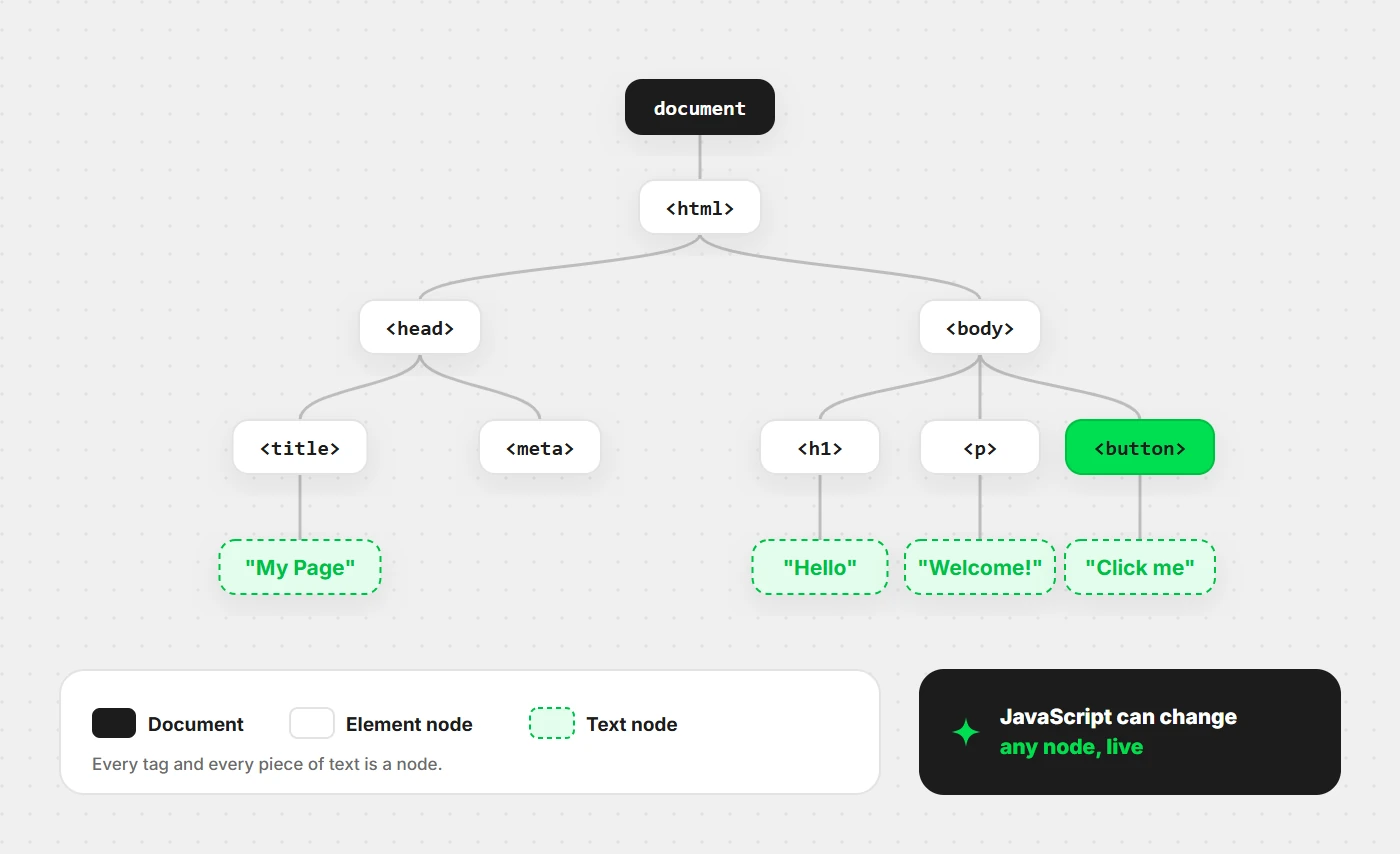
When a browser loads your HTML, it builds a live, in-memory tree of objects called the DOM (Document Object Model). Every tag becomes a node; nesting becomes parent-child relationships. JavaScript can read and rewrite that tree at any moment — and the page updates instantly.
Selecting elements
Before you can change something, you have to grab it. Modern code uses two methods
for almost everything — querySelector (first match) and
querySelectorAll (all matches), both using CSS selectors:
// One element (first match)
const title = document.querySelector("h1");
const box = document.querySelector(".card");     // by class
const menu = document.querySelector("#navbar");  // by id

// Many elements → a NodeList you can loop over
const buttons = document.querySelectorAll(".btn");
buttons.forEach(btn => console.log(btn.textContent));
If you learn just these two, you can select anything on any page. The older
getElementById still works, but querySelector covers it
and more with one consistent syntax.
Changing content & styles
Once you’ve got an element, you change it through its properties:
const title = document.querySelector("h1");

title.textContent = "Updated by JS";       // set plain text (safe)
title.style.color = "tomato";               // inline style
title.classList.add("active");              // add a CSS class
title.classList.toggle("hidden");           // flip a class on/off
title.setAttribute("data-id", "42");        // set any attribute
One safety note: prefer textContent over innerHTML when
you’re inserting user-provided text. innerHTML parses its value
as HTML, which can run injected scripts — a classic security hole (XSS). Use
innerHTML only with content you control.
Creating & removing elements
You can build new nodes from scratch and drop them into the page:
// Create
const li = document.createElement("li");
li.textContent = "New item";
li.classList.add("list-item");

// Add it to a list
const list = document.querySelector("ul");
list.appendChild(li);

// Remove it later
li.remove();
This create → configure → append flow is exactly how a to-do list adds a row, or how search results appear without a page reload. Build a tiny to-do app with just this and the DOM will click permanently.
The whole DOM game is one move, repeated: select an element, then do something to it.
Handling events
Interactivity comes from events — clicks, keypresses, form
submits, mouse moves. You listen with addEventListener:
const button = document.querySelector("button");

button.addEventListener("click", (event) => {
  console.log("Clicked!", event.target);
});

// Reacting to typing
const input = document.querySelector("input");
input.addEventListener("input", (e) => {
  console.log("Current value:", e.target.value);
});
That event object is packed with useful info: event.target
(what was clicked), event.key (which key), and
event.preventDefault() (stop the browser’s default, like a form
reloading the page).
form.addEventListener("submit", (e) => {
  e.preventDefault();   // stop the page from reloading
  console.log("Form handled by JS instead");
});
Bubbling & delegation
When you click an element, the event doesn’t stop there — it bubbles up through every ancestor to the document. That sounds like trivia, but it unlocks a powerful pattern: event delegation.
Instead of adding a listener to every one of 100 list items, add one to the parent and let bubbling bring the clicks to you:
const list = document.querySelector("ul");

list.addEventListener("click", (e) => {
  // Did the click come from an <li>?
  if (e.target.tagName === "LI") {
    console.log("You clicked:", e.target.textContent);
  }
});
One listener handles all items — even items you add later. That’s more efficient and less code than wiring up each child. It’s the professional way to handle lists, tables, and dynamic content.
Wrapping this up
Select with querySelector, change with textContent /
classList / style, build with createElement
and appendChild, react with addEventListener, and scale
with delegation. That toolkit builds every interactive UI you’ll ever need in
plain JavaScript — and it’s the foundation frameworks are built on top of.
Newer to JS? Read my complete JavaScript guide for beginners first. Then build a to-do list tonight using only what’s on this page — add, remove, and mark items done. That one project teaches the whole DOM. 🚀