
Getting a full-stack app onto Vercel takes about ninety seconds: connect the repo, hit deploy, done. Keeping it healthy once real traffic and a real database show up is a different story — and that’s where the surprises live. Your connections mysteriously max out. A file you wrote at runtime vanishes. The bill triples after one viral day. None of that is Vercel misbehaving; it’s serverless behaving exactly as designed while you write code like it’s a long-lived server. I’m Shivam Thakur — here’s the whole picture, from first push to production.
The mental model that prevents most bugs
On a traditional VPS you rent a computer. It boots once, your app runs forever, and anything you put in memory or on disk stays there. Vercel is not that. Your app is split into two very different halves:
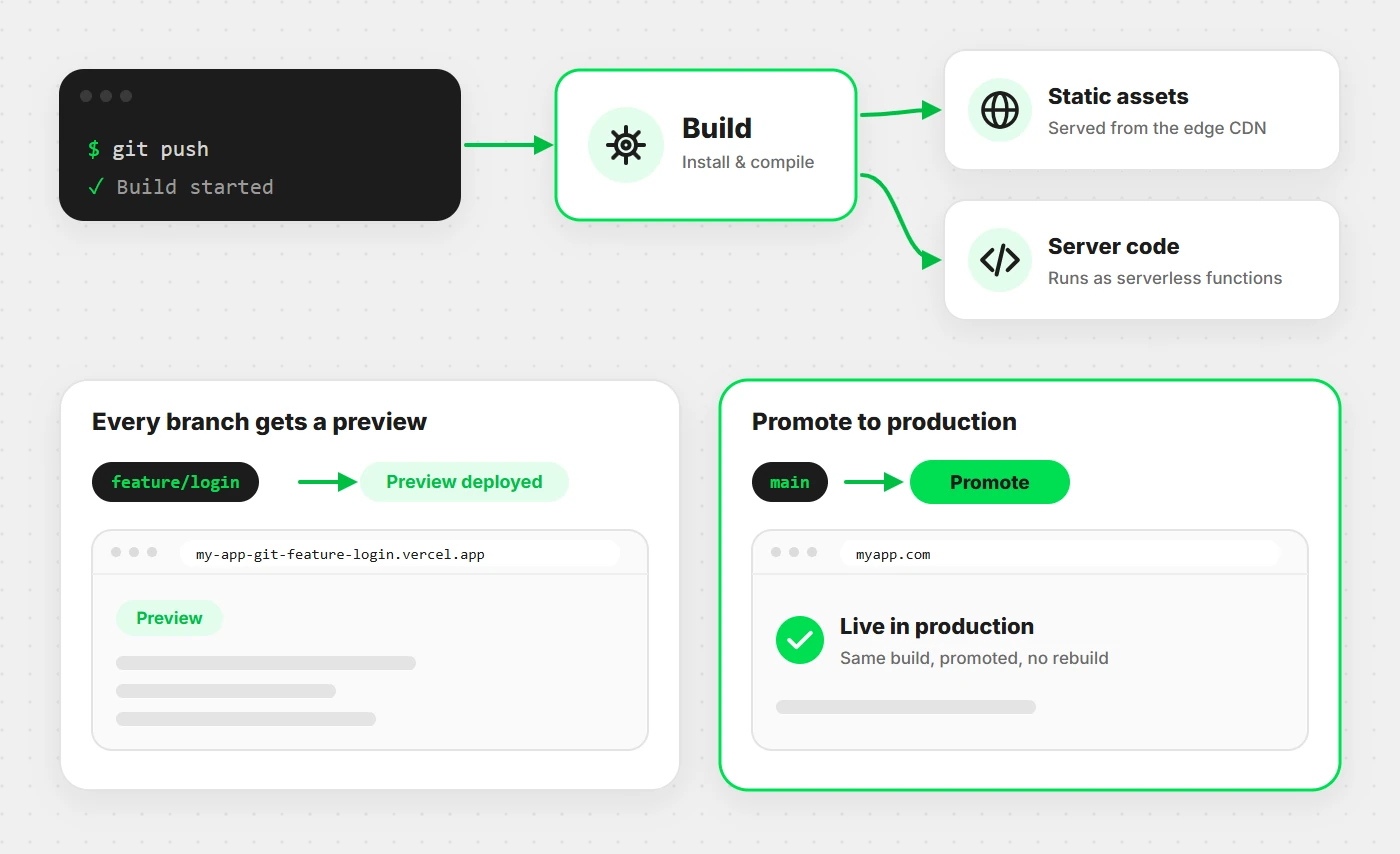
- Static assets — HTML, CSS, JS, images. Built once, pushed to a global CDN, served from the edge location nearest your visitor. Ridiculously fast, effectively free.
- Serverless functions — your API routes and server rendering. Each one boots on demand when a request arrives, does its job, and is thrown away.
That last word is the whole game. Thrown away. Internalise these three consequences and you’ve pre-empted most of what goes wrong:
- Memory doesn’t persist. A variable you set on one request may not exist on the next — different instance. No in-memory sessions, no in-memory rate limiter, no in-memory cache you actually trust.
- The filesystem is read-only apart from
/tmp, which is also temporary. Uploads go to blob storage, never to disk. - Nothing runs between requests. No background worker ticking away, no
setIntervalthat survives. Scheduled work needs cron.
Your first deploy
The happy path genuinely is short. Push your repo to GitHub, import it at
vercel.com/new, and Vercel detects the framework and its build settings
on its own. Prefer the terminal?
npm i -g vercel

vercel          # deploys a preview, links the project on first run
vercel --prod   # deploys to production
For most frameworks you need no config file at all — and that’s
the recommended state. Reach for vercel.json only when you want
something the defaults don’t give you, like redirects, cron jobs or per-function
limits:
{
  "redirects": [
    { "source": "/old-pricing", "destination": "/pricing", "permanent": true }
  ],
  "functions": {
    "app/api/report/route.ts": { "maxDuration": 60 }
  },
  "crons": [
    { "path": "/api/cron/digest", "schedule": "0 9 * * *" }
  ]
}
A note that saves real debugging time: Vercel builds run
npm install from your lockfile, not from your node_modules.
If a package works locally but explodes in the build, nine times out of ten
it’s a dependency you installed and never committed to
package.json. Delete node_modules locally, reinstall
clean, and you’ll reproduce the failure before Vercel does.
Preview deployments & rollbacks
This is the feature that quietly changes how a team works, and the one people under-use. Every push to any non-production branch gets its own live URL — a real build, real functions, real environment. Not a mock. Not “works on my machine.” A link you can drop in a pull request and have a designer or client click.
- Preview — every branch push. Permanent URL, shareable, safely disposable.
- Production — a merge to your production branch. Served on your custom domain.
Because both come out of the same pipeline, a green preview is strong evidence production will behave. And when something slips through anyway, every past deployment stays addressable, so recovery is a promotion rather than a panicked revert-and-rebuild:
vercel rollback          # back to the previous production deployment
vercel ls                # list deployments
vercel promote <url>     # promote any past deployment to production
A rollback should be boring. If shipping on Friday scares you, the problem isn’t Friday — it’s that you can’t undo in one command.
Environment variables done right
Your local .env file does not travel with your code — it’s
gitignored, as it should be. Secrets live in the Vercel dashboard (or the CLI), scoped
to three environments:
vercel env add DATABASE_URL production
vercel env add DATABASE_URL preview
vercel env pull .env.local   # pull them down for local dev
The rule that matters most here, and the one that causes genuine security incidents:
anything prefixed NEXT_PUBLIC_ is baked into the JavaScript
bundle and visible to every visitor. View source and it’s right
there. Same idea for VITE_ in Vite apps.
// ✅ Safe — server-only, never reaches the browser
const db = process.env.DATABASE_URL;
const stripeSecret = process.env.STRIPE_SECRET_KEY;

// ✅ Fine to expose — genuinely public values
const analyticsId = process.env.NEXT_PUBLIC_ANALYTICS_ID;

// ❌ Catastrophic — your secret key is now public
const key = process.env.NEXT_PUBLIC_STRIPE_SECRET_KEY;
Two habits worth forming. Give preview a separate database from production — previews are for experiments, and experiments shouldn’t be able to drop real customer data. And remember env vars are read at build time for anything statically rendered: changing a value in the dashboard does nothing until you redeploy.
The backend: serverless functions
Anything in your API folder becomes a function. No Express app to boot, no port to listen on, no process to keep alive:
// app/api/users/route.js  — Next.js App Router
export async function GET(request) {
  const users = await db.user.findMany();
  return Response.json(users);
}

export async function POST(request) {
  const body = await request.json();
  const user = await db.user.create({ data: body });
  return Response.json(user, { status: 201 });
}
Two runtimes are available, and picking wrong is a common source of “why doesn’t my library work here”:
- Node.js runtime (the default) — the full Node API and any npm package. This is what you want for database clients, SDKs, file processing. Start here.
- Edge runtime — a lighter, faster-starting sandbox running close to the user, but with a restricted API surface: no native Node modules, so most database drivers won’t load. Great for auth checks, redirects, geolocation, A/B tests.
Worth knowing: with Fluid Compute — now the default for new projects — a single function instance can serve multiple concurrent requests instead of one-at-a-time. That change matters for you in two ways: cold starts get rarer, and because you’re billed for actual CPU rather than idle wall-clock time, I/O-heavy work (waiting on a database or an AI API) gets dramatically cheaper. It also makes reusing a database client across invocations more valuable than ever.
Databases & the connection pooling trap
Vercel doesn’t host your database — it connects to one over the network. Neon, Supabase, PlanetScale and MongoDB Atlas all work well, and the marketplace wires the credentials in as env vars automatically. So far, simple.
Here’s the trap that catches nearly everyone. Traffic spikes, Vercel spins up hundreds of function instances, each one opens its own database connection — and your Postgres instance, which caps out at maybe 100, starts refusing everything. Your app doesn’t slow down; it falls over. And it only happens under load, so it never shows up in testing.
Two fixes, and you want both. First, never create a client per request:
// ❌ New connection on every single invocation
export async function GET() {
  const client = new PrismaClient();   // don't
  return Response.json(await client.user.findMany());
}

// ✅ Reuse across invocations on the same instance
// lib/db.js
import { PrismaClient } from "@prisma/client";

const globalForPrisma = globalThis;
export const db = globalForPrisma.prisma ?? new PrismaClient();

if (process.env.NODE_ENV !== "production") globalForPrisma.prisma = db;
Second — and this is the non-negotiable one — put a pooler in front of the database. A pooler keeps a small set of real connections and multiplexes every function’s request through them, so a thousand instances still map to a handful of connections:
# ❌ Direct connection — will exhaust connection limits under load
DATABASE_URL="postgres://user:pass@db.example.com:5432/mydb"

# ✅ Pooled endpoint (Neon example — note -pooler and pgbouncer=true)
DATABASE_URL="postgres://user:pass@db-pooler.example.com:5432/mydb?pgbouncer=true&connection_limit=1"
Neon exposes a pooled hostname, Supabase gives you a pooler port, and Prisma
Accelerate does the job provider-agnostically. One caveat to file away: schema
migrations need the direct connection, not the pooled one — hence
Prisma’s separate directUrl.
Caching & rendering strategy
The fastest function is the one that never runs. Every page you can serve from the CDN instead of computing per request is money saved and latency removed. Decide deliberately, per route:
- Static — rendered at build time, served from the CDN. Marketing pages, docs, blog posts. Nearly free, nearly instant.
- ISR — static, but regenerated on a timer. Product listings, feeds — content that changes hourly, not per user.
- Dynamic — rendered per request. Dashboards, anything personalised. Necessary, but the expensive option.
// Static — the default
export default function Page() { return <h1>About</h1>; }

// ISR — rebuild at most once an hour
export const revalidate = 3600;

// Dynamic — every request, no caching
export const dynamic = "force-dynamic";
For API routes, cache headers are the lever. Even a short
s-maxage collapses a traffic spike into a handful of real executions,
and stale-while-revalidate means nobody waits for the refresh:
export async function GET() {
  const posts = await db.post.findMany();

  return Response.json(posts, {
    headers: {
      // Serve cached for 60s, then serve stale while refreshing in background
      "Cache-Control": "s-maxage=60, stale-while-revalidate=300",
    },
  });
}
A default I’d push on anyone: start static, go dynamic only when the page genuinely needs per-request data. The instinct to make everything dynamic “just in case” is what turns a $0 project into a $200 one.
Custom domains & cron jobs
Domains are the easy part. Add it in the dashboard, point the DNS records Vercel gives you, and SSL is provisioned and renewed automatically — no certbot, no expiry reminders in your calendar.
vercel domains add example.comScheduled work needs cron, because — as established — nothing of yours runs between requests. A cron job is just Vercel calling one of your routes on a schedule:
// app/api/cron/cleanup/route.js
export async function GET(request) {
  // Anyone can hit this URL — verify it's actually Vercel calling
  const auth = request.headers.get("authorization");
  if (auth !== `Bearer ${process.env.CRON_SECRET}`) {
    return new Response("Unauthorized", { status: 401 });
  }

  await db.session.deleteMany({ where: { expiresAt: { lt: new Date() } } });
  return Response.json({ ok: true });
}
Note the auth check — it isn’t optional. Cron routes are public URLs
like any other, and an unprotected one is an open invitation to have your cleanup
job (or worse, your billing job) triggered by a stranger. Set
CRON_SECRET and Vercel sends it automatically.
Five gotchas that bite in production
Every one of these follows from the mental model at the top. They still catch people, so let’s make them explicit:
- Writing files.
fs.writeFile("./uploads/x.png")throws — read-only filesystem. Only/tmpis writable, and it evaporates. Uploads belong in Vercel Blob or S3. - In-memory anything. A rate limiter or cache in a module-level variable works locally with one process, then silently fails across many instances. Use Redis (Upstash) or Edge Config.
- Long-running jobs. Functions have a duration ceiling; video encoding or a big report will hit it. Push the work to a queue or Vercel Workflow, and return immediately.
- WebSockets. Functions are request/response — they can’t hold a socket open. Realtime needs Pusher, Ably, or Supabase Realtime.
- Fat bundles. Import a 200MB SDK into a function and you get slow cold starts and deploy failures. Import only what you use; check the bundle size in the build output.
Keeping the bill sane
Vercel’s free tier carries a real hobby project comfortably. The horror stories you’ve read almost always trace back to the same handful of causes, all of which are preventable:
- Everything rendered dynamically when most of it could be static or ISR.
- Unoptimised images — shipping a 4MB hero JPEG to every visitor instead of letting the image component resize and re-encode it.
- No cache headers on API routes, so identical requests re-execute forever.
- A bot or scraper hammering a dynamic route with nobody watching.
Do three things and you’ve covered it: set a spend limit in the dashboard, turn on bot protection for expensive routes, and actually look at the analytics tab occasionally to see which route is burning your budget. A surprise bill is nearly always a monitoring failure before it’s a pricing one.
Pre-launch checklist
Before you point a real domain at it and tell people, walk this list. It’s short on purpose:
- Production env vars set — and no secret carrying a
NEXT_PUBLIC_prefix. - Database behind a pooled connection string, client reused across invocations.
- Preview pointed at a separate database from production.
- Static or ISR everywhere that doesn’t truly need per-request rendering.
- Cache headers on public API routes.
- Cron routes protected with
CRON_SECRET. - Custom domain added, SSL confirmed,
wwwredirecting the way you want. - Spend limit set. Rollback tried once, so you know it works before you need it.
Wrapping this up
Vercel makes deploying trivial and makes everything else a question of whether you’ve accepted how serverless works. Static assets go to the edge, server code runs in functions that appear and vanish per request, and every problem in this article — connection exhaustion, lost files, evaporating memory, runaway bills — is that one fact showing up in a different costume.
So: pool your database connections, keep state in a real store, cache aggressively, and let preview deployments carry your review process. Do that and Vercel stops being a thing you fight and becomes the boring, reliable layer it’s meant to be.
Designing the API that sits behind all this? My REST vs GraphQL guide covers picking the right style. Then deploy something small this week — a single API route hitting a pooled database. Nothing teaches this faster than watching your first preview URL go live. 🚀