
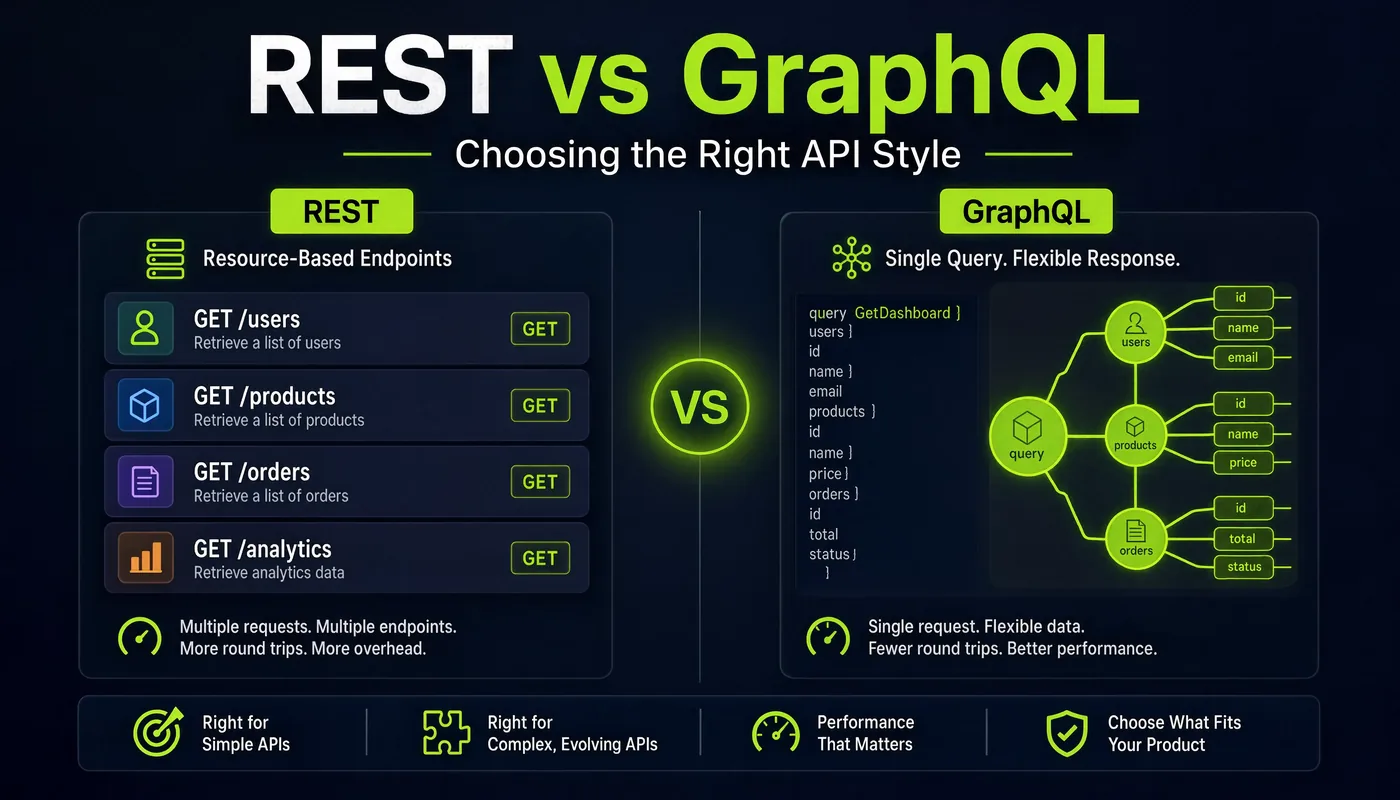
So you want to build an API. Cool. But then someone in your team chat drops “should we just use GraphQL?” and suddenly there’s a 45-message thread, three people arguing about “over-fetching,” and someone linked a decade-old blog post like it’s scripture. Take a breath. Grab your coffee — we’re going to walk through this together, like I’m sitting next to you with a marker at the whiteboard, explaining why your friend’s startup picked GraphQL and why your bank’s API will probably never touch it.
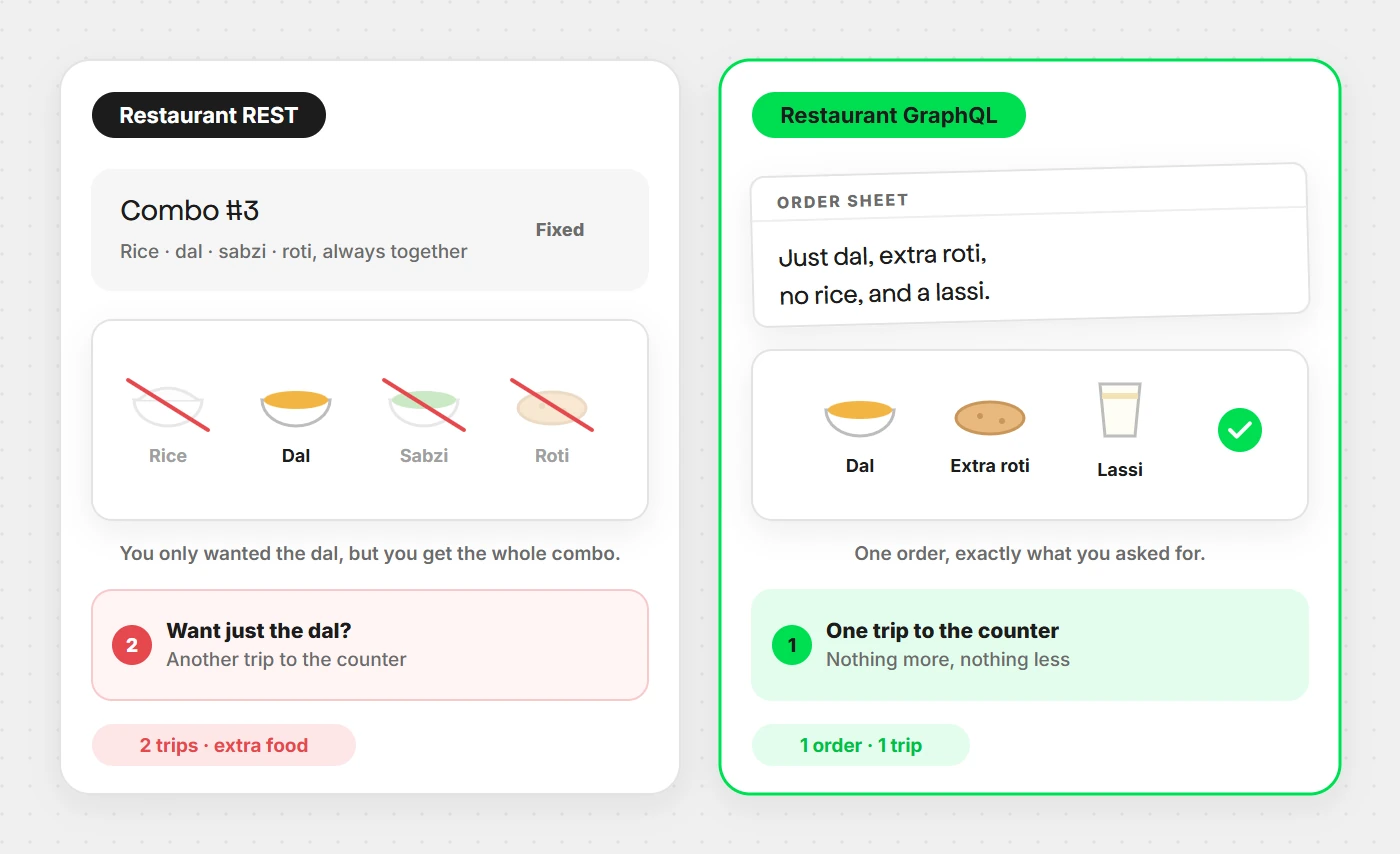
The restaurant analogy (why this whole debate exists)
Imagine two restaurants. Restaurant REST has a menu with fixed combos — you order “Combo #3” and get everything in it, rice, dal, sabzi, roti, even if you only wanted the dal. Want just the dal? Order it separately, on another trip to the counter. Restaurant GraphQL hands you a blank order sheet instead. You write exactly what you want — “just dal, extra roti, no rice, and a lassi” — one order, one trip, exactly what you asked for. Nothing more, nothing less.
That one analogy explains most of the REST vs GraphQL debate. Keep it in your back pocket — we’ll come back to it.
What REST actually is
REST stands for Representational State Transfer — a fancy name for a simple idea, defined by Roy Fielding in his year-2000 PhD thesis (yes, REST is old enough to have a driver’s license). The core idea: everything is a resource, and you interact with resources using standard HTTP methods.
Think of your app’s data as nouns — a user is /users,
a specific user is /users/42, that user’s orders are
/users/42/orders. HTTP verbs are the actions you take on those
nouns:
| HTTP method | What it does | Plain-English version |
|---|---|---|
GET | Read data | “Show me” |
POST | Create new data | “Make a new one” |
PUT | Replace data entirely | “Replace the whole thing” |
PATCH | Update part of the data | “Just tweak this field” |
DELETE | Remove data | “Get rid of it” |
So GET /users/42 means “show me user 42.”
DELETE /users/42 means “delete user 42.” Simple,
predictable, and exactly why REST took over the internet for two decades.
The rules that make an API “RESTful”
Not every JSON-over-HTTP API is truly RESTful. To earn the name, an API should follow:
- Client–server separation — frontend and backend only need to agree on the contract, not each other’s internals.
- Statelessness — every request carries everything needed to process it; the server doesn’t remember you between calls.
- Cacheability — responses should indicate whether they can be cached, saving everyone bandwidth.
- Uniform interface — consistent naming and structure across every endpoint.
- Layered system — the client shouldn’t need to know if it’s talking to the server directly or through a proxy or gateway.
Building a real REST API, step by step
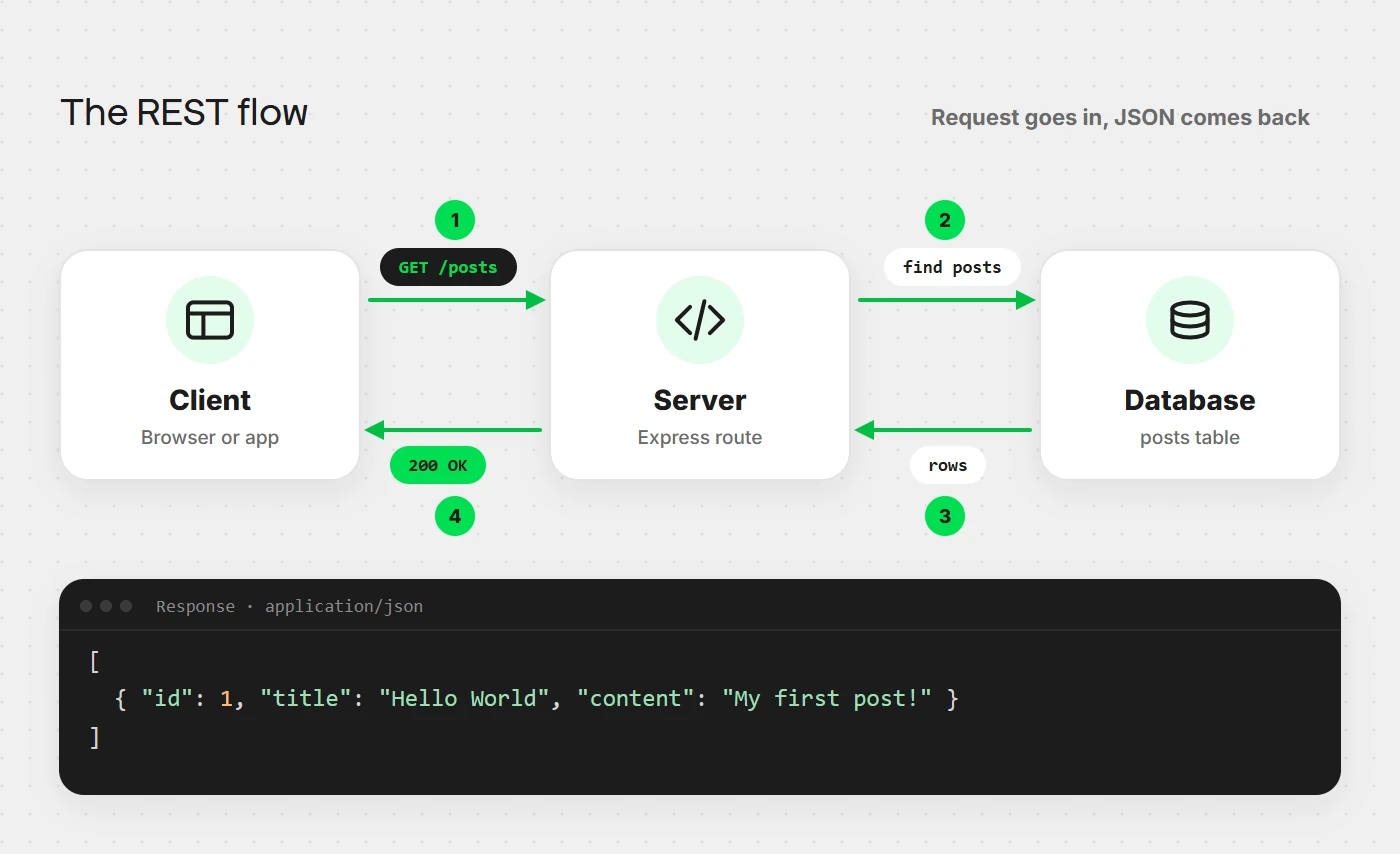
Let’s actually build one — a simple Blog Posts API using Node.js and Express, the friendliest combo for beginners.
Step 1: Set up your project
mkdir rest-blog-api && cd rest-blog-api
npm init -y
npm install express
Step 2: Design your resources first
This is the step beginners skip and regret later. Sketch your endpoints before writing code:
GET    /posts          → get all posts
GET    /posts/:id      → get one post
POST   /posts          → create a post
PATCH  /posts/:id      → update a post
DELETE /posts/:id      → delete a post
Step 3: Write the server
// server.js
const express = require('express');
const app = express();
app.use(express.json());

let posts = [
  { id: 1, title: "Hello World", content: "My first post!" }
];

// GET all posts
app.get('/posts', (req, res) => {
  res.json(posts);
});

// GET single post
app.get('/posts/:id', (req, res) => {
  const post = posts.find(p => p.id === parseInt(req.params.id));
  if (!post) return res.status(404).json({ error: "Post not found" });
  res.json(post);
});

// CREATE a post
app.post('/posts', (req, res) => {
  const newPost = { id: posts.length + 1, ...req.body };
  posts.push(newPost);
  res.status(201).json(newPost);
});

// UPDATE a post
app.patch('/posts/:id', (req, res) => {
  const post = posts.find(p => p.id === parseInt(req.params.id));
  if (!post) return res.status(404).json({ error: "Post not found" });
  Object.assign(post, req.body);
  res.json(post);
});

// DELETE a post
app.delete('/posts/:id', (req, res) => {
  posts = posts.filter(p => p.id !== parseInt(req.params.id));
  res.status(204).send();
});

app.listen(3000, () => console.log("REST API running on port 3000"));
Run it with node server.js, and you’ve got a working REST API.
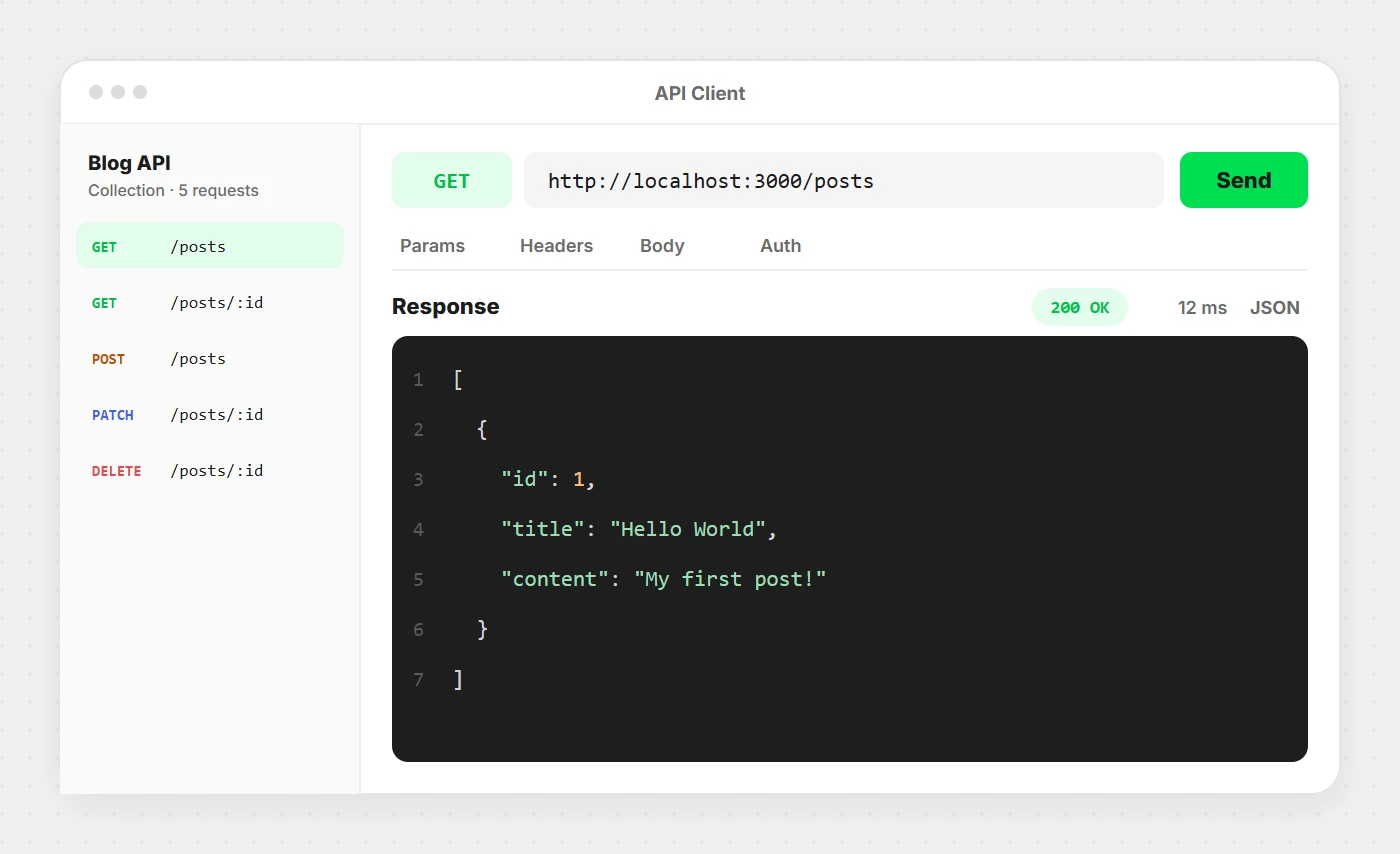
GET /posts in Postman — the JSON response comes back exactly as designed.Step 4: Status codes actually matter
This is where a lot of “REST” APIs quietly fail — don’t just return 200 for everything:
| Code | Meaning | When to use it |
|---|---|---|
200 OK | Success | Successful GET/PATCH |
201 Created | New resource made | Successful POST |
204 No Content | Success, nothing to return | Successful DELETE |
400 Bad Request | Client sent garbage | Missing/invalid fields |
401 Unauthorized | Not logged in | Missing/invalid auth token |
403 Forbidden | Logged in, not allowed | Permission issue |
404 Not Found | Resource doesn’t exist | Wrong ID |
500 Internal Server Error | Something broke server-side | Unhandled exception |
A friend once shipped an API that returned 200 OK even on failure, with the error tucked inside the JSON body. Debugging that was a nightmare — don’t be that friend.
Step 5: Add authentication
The industry standard today is JWT (JSON Web Tokens). A rough flow looks like this:
const jwt = require('jsonwebtoken');
const SECRET = "your-secret-key";

// Login route generates a token
app.post('/login', (req, res) => {
  // ... validate username/password ...
  const token = jwt.sign({ userId: 1 }, SECRET, { expiresIn: '1h' });
  res.json({ token });
});

// Middleware to protect routes
function authenticate(req, res, next) {
  const token = req.headers.authorization?.split(' ')[1];
  if (!token) return res.status(401).json({ error: "No token provided" });
  try {
    req.user = jwt.verify(token, SECRET);
    next();
  } catch {
    res.status(401).json({ error: "Invalid token" });
  }
}

// Protected route
app.delete('/posts/:id', authenticate, (req, res) => {
  // only reachable with a valid token
});
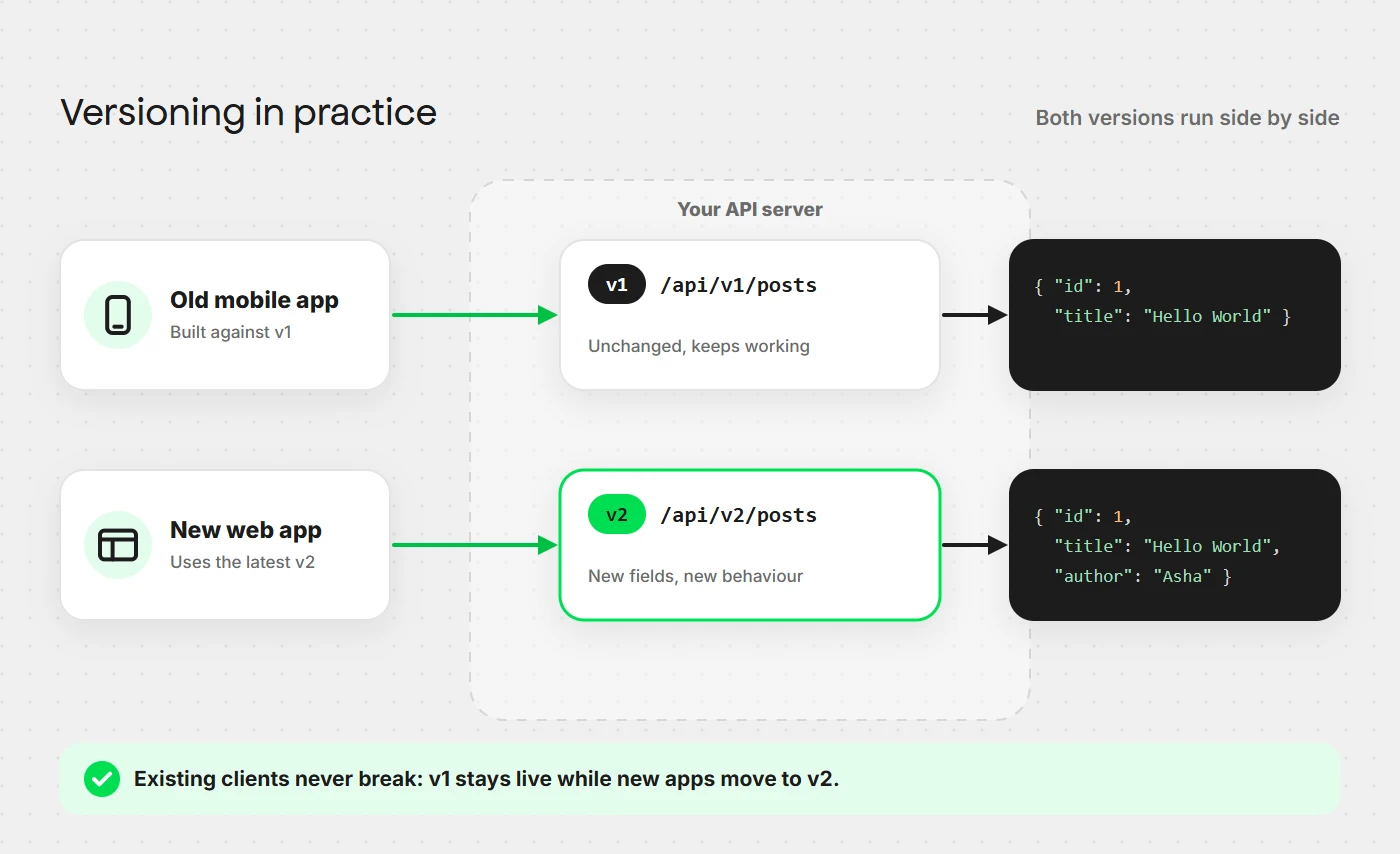
Step 6: Versioning
Never break existing users. Version your API from day one:
/api/v1/posts
/api/v2/posts
When you make breaking changes, ship v2 and give people time to migrate off v1.

Pick the style that fits the shape of your data and the number of clients — not the one that’s trending this year.
What GraphQL actually is
GraphQL was built by Facebook in 2012 (released publicly in 2015) because their mobile app was making a dozen REST calls just to render one screen, pulling way more data than needed on slow mobile networks. Sound familiar? That’s the “over-fetching, under-fetching” problem.
Over-fetching: GET /users/42 returns the user’s
name, email, address, bio, join date, and last login — but your app only
needed the name and photo. You pay the bandwidth cost for data you’ll
never use. Under-fetching: you need a user’s name AND
their last five orders — that’s two separate calls for one screen.
GraphQL fixes both with one core idea: the client asks for exactly the shape of data it wants, in a single request.
Here’s what a GraphQL query actually looks like:
query {
  user(id: 42) {
    name
    profilePicture
    orders(limit: 5) {
      id
      total
      status
    }
  }
}
And the response mirrors exactly that shape:
{
  "data": {
    "user": {
      "name": "Riya Sharma",
      "profilePicture": "riya.jpg",
      "orders": [
        { "id": 101, "total": 599, "status": "delivered" },
        { "id": 102, "total": 250, "status": "pending" }
      ]
    }
  }
}
No extra fields, no extra calls — one request, exact shape. That’s the whole trick.
Building a real GraphQL API, step by step
Let’s build the same Blog Posts API, this time in GraphQL, using Apollo Server.
Step 1: Set up your project
mkdir graphql-blog-api && cd graphql-blog-api
npm init -y
npm install @apollo/server graphql
Step 2: Define your schema
Before writing any logic, you write a schema — a contract of exactly what data and operations exist. This alone eliminates a huge amount of miscommunication between frontend and backend teams.
type Post {
  id: ID!
  title: String!
  content: String!
}

type Query {
  posts: [Post]
  post(id: ID!): Post
}

type Mutation {
  createPost(title: String!, content: String!): Post
  updatePost(id: ID!, title: String, content: String): Post
  deletePost(id: ID!): Boolean
}
Notice: REST bakes GET/POST/PATCH/DELETE
into HTTP itself. GraphQL splits everything into just two buckets —
Query (reading, like GET) and Mutation
(changing data, like POST/PATCH/DELETE combined).
Step 3: Write your resolvers
Resolvers are just functions that know how to fetch or change data for each field in your schema.
// server.js
const { ApolloServer } = require('@apollo/server');
const { startStandaloneServer } = require('@apollo/server/standalone');

let posts = [
  { id: "1", title: "Hello World", content: "My first post!" }
];

const typeDefs = `#graphql
  type Post {
    id: ID!
    title: String!
    content: String!
  }

  type Query {
    posts: [Post]
    post(id: ID!): Post
  }

  type Mutation {
    createPost(title: String!, content: String!): Post
    updatePost(id: ID!, title: String, content: String): Post
    deletePost(id: ID!): Boolean
  }
`;

const resolvers = {
  Query: {
    posts: () => posts,
    post: (_, { id }) => posts.find(p => p.id === id),
  },
  Mutation: {
    createPost: (_, { title, content }) => {
      const newPost = { id: String(posts.length + 1), title, content };
      posts.push(newPost);
      return newPost;
    },
    updatePost: (_, { id, title, content }) => {
      const post = posts.find(p => p.id === id);
      if (!post) return null;
      if (title) post.title = title;
      if (content) post.content = content;
      return post;
    },
    deletePost: (_, { id }) => {
      const exists = posts.some(p => p.id === id);
      posts = posts.filter(p => p.id !== id);
      return exists;
    },
  },
};

const server = new ApolloServer({ typeDefs, resolvers });

startStandaloneServer(server, { listen: { port: 4000 } }).then(({ url }) => {
  console.log(`GraphQL API running at ${url}`);
});
Run it, and Apollo gives you a built-in playground at http://localhost:4000 to test queries visually.
Step 4: Try some queries
Get all posts, but only titles — no content:
query {
  posts {
    id
    title
  }
}
Create a new post:
mutation {
  createPost(title: "GraphQL is fun", content: "Seriously, it is.") {
    id
    title
  }
}
See how the client controls the shape every single time? That’s the whole philosophy.
Step 5: The N+1 problem
Here’s the thing nobody warns beginners about. Say you query:
query {
  posts {
    title
    author {
      name
    }
  }
}
With 100 posts, a naive resolver runs one query to get the posts, then 100 separate queries to fetch each author. That’s the dreaded N+1 problem, and it will quietly wreck your database performance. The fix is a library called DataLoader, which batches and caches those lookups into one efficient query:
const DataLoader = require('dataloader');

const authorLoader = new DataLoader(async (authorIds) => {
  const authors = await db.getAuthorsByIds(authorIds);
  return authorIds.map(id => authors.find(a => a.id === id));
});
Every serious GraphQL API uses this pattern. Learn it early, thank yourself later.
REST vs GraphQL — the honest comparison
| REST | GraphQL | |
|---|---|---|
| Data fetching | Fixed shape per endpoint | Client defines exact shape |
| Number of endpoints | Many (one per resource) | Usually just one (/graphql) |
| Over/under-fetching | Common problem | Solved by design |
| Caching | Easy (HTTP caching, CDNs) | Harder (needs custom setup) |
| File uploads | Native and simple | Needs extra libraries/specs |
| Learning curve | Gentle, widely known | Steeper (schemas, resolvers) |
| Versioning | Needs /v1, /v2, etc. | Usually versionless — add fields instead |
| Tooling maturity | Extremely mature, huge ecosystem | Mature, but younger |
| Best for | Public APIs, simple CRUD apps, caching-heavy use cases | Complex frontends, mobile apps, deeply related data |
When to actually pick REST
- You’re building a public API that many third parties will consume — REST is more universally understood.
- HTTP caching at the CDN level is critical for performance.
- Your data model is simple, without deeply nested relationships.
- Your team is more comfortable with it and time-to-market matters.
When to actually pick GraphQL
- You have multiple clients (web, iOS, Android) each needing different slices of the same data.
- Your screens need deeply nested, related data — think dashboards or social feeds.
- You’re on mobile or low-bandwidth and over-fetching genuinely costs you.
- Your frontend team wants independence from backend release cycles.
Real talk: a lot of companies use both — GraphQL as a layer in front of internal REST microservices is a very common pattern. It’s literally what GraphQL was invented to solve at Facebook.
Common mistakes with both
REST mistakes
- Not using proper HTTP status codes — returning 200 for errors makes debugging painful.
- Verbs in URLs —
/getUserinstead ofGET /user. Resources are nouns; methods are verbs. - No pagination —
GET /postsreturning 100,000 rows will eventually break your app. Always paginate. - Ignoring HATEOAS — not mandatory, but including links to related actions genuinely helps discoverability.
- Deeply nested URLs —
/users/42/posts/12/comments/5/replies/3gets absurd fast. Flatten when you can.
GraphQL mistakes
- Ignoring the N+1 problem until production traffic exposes it painfully.
- No query depth limiting — a careless or malicious client can crash your server with a deeply nested query. Always cap depth and complexity.
- Treating every field as always-fetched — the whole point is selective fetching; don’t defeat that with resolvers that do heavy work regardless of what’s requested.
- Skipping schema documentation — your schema is self-documenting if you add descriptions to types and fields. Use it.
- No error handling strategy — GraphQL returns
200 OKeven on errors (they live in anerrorsarray), which trips up developers used to REST status codes.
Tools worth bookmarking
For REST: Postman, Insomnia or Thunder Client for testing endpoints; Swagger/OpenAPI for documenting and auto-generating client SDKs; Express, FastAPI, Django REST Framework or Spring Boot as popular frameworks.
For GraphQL: Apollo Server/Client as the most popular stack; GraphQL Yoga as a lighter alternative; Postman (it supports GraphQL now); GraphiQL or Apollo Sandbox for built-in query playgrounds; DataLoader for solving N+1; Hasura or PostGraphile to auto-generate a GraphQL API straight from your database.
Wrapping this up
Here’s the truth nobody tells you upfront: REST and GraphQL aren’t rivals fighting to the death — they’re two tools solving two flavors of the same problem. REST is the reliable friend who’s been around forever and rarely surprises you. GraphQL is the newer friend who’s incredibly flexible, but asks a bit more of you upfront — schema design, N+1 awareness, query complexity limits.
If you’re a beginner, start with REST. It teaches HTTP fundamentals that make you a better engineer no matter what you build later. If you’re already experienced and picking for a real project, go back to the restaurant analogy: does your client need the whole combo meal, or a custom order? That question alone gets you to the right answer nine times out of ten.
Now go build something. 😄